


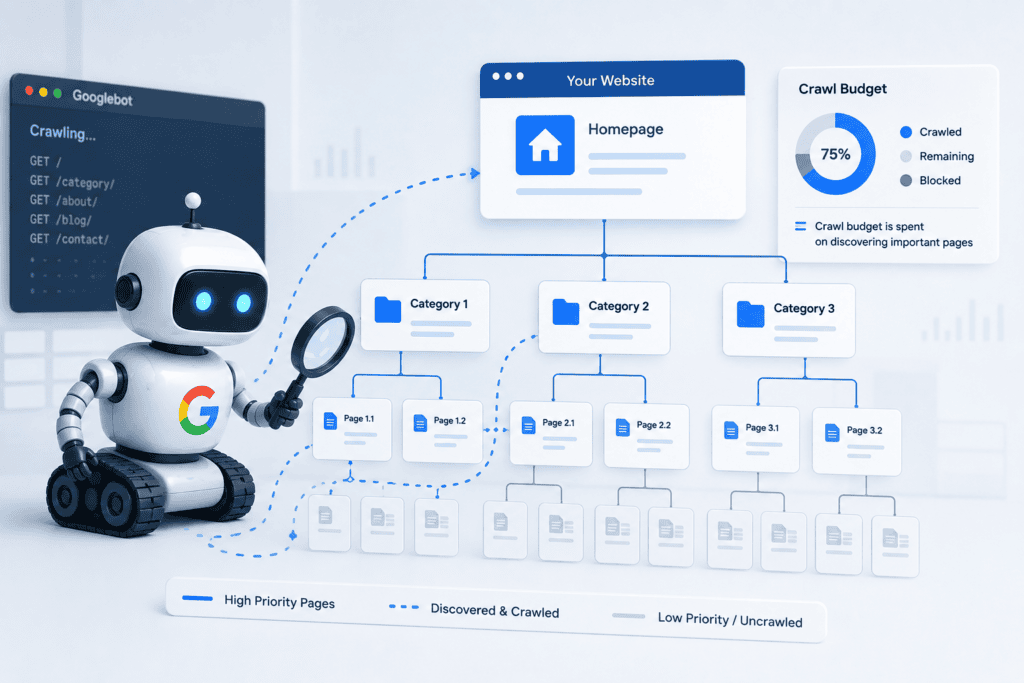
Picture Googlebot as a delivery driver with a fixed number of stops per day. Your entire website is the neighborhood. If the driver keeps being sent to dead-end streets, incorrect addresses, or duplicate locations, they run out of time before reaching the stops that actually matter.
Table of Contents
That's the crawl budget in a sentence.
Essentially, it is the number of URLs that Googlebot will retrieve from your website within a certain period. The value isn't constant, nor is it published; it's determined by Google many times based on how your website is performing and the value they are placing on your content. When Googlebot reaches the limit, it leaves. In case pages don’t get crawled within that time period, they stay wherever they were in the index or remain out.
A small brochure site with 20 pages will not have this issues; this is a non-issue. For a service company that's been publishing blog content for five years, or a business that recently migrated its website, it can silently suppress rankings for months.
Crawl Demand vs. Crawl Capacity - Why Both Matter
These two forces pull against each other, and understanding them changes how you think about optimization.

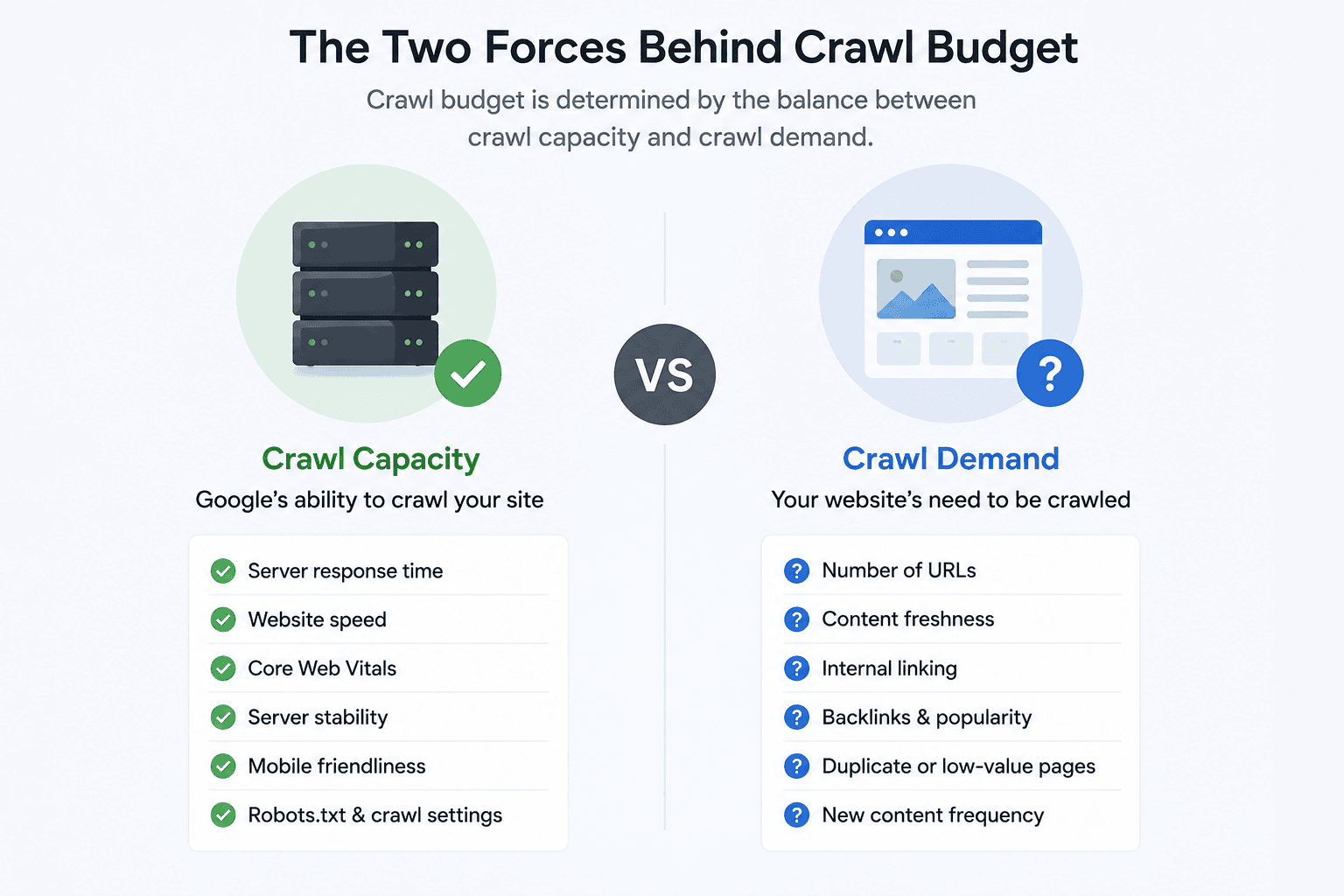
Crawl capacity is how hard Googlebot is willing to work on your site before it risks slowing things down for actual users. Google throttles its own crawl speed based on your server response time. A slow server means Googlebot backs off, not out of courtesy, but because a crawl-induced slowdown would reflect badly on the user experience Google sends people to. Improve your server speed, and you naturally increase the ceiling on how much Google can crawl.
Crawl demand is how much Google wants to crawl your site in the first place. This comes down to perceived value. Fresh, frequently updated content from an authoritative domain gets crawled aggressively. A static site with low backlinks and thin content gets checked in occasionally. It's a signal loop: sites that look authoritative get crawled more, which helps them rank better, which makes them look more authoritative.
The implication is that crawl budget optimization has two levers: remove what's wasting Google's time and improve the signals that make Google want to come back more often.
3. Is Your Site Actually Affected?
Before diving into fixes, it's worth figuring out whether crawl budget is actually your problem or whether something else is driving the issue.
Signs that point to a crawl budget problem:
- Fresh blog posts or new service pages take three to four weeks (or longer) to appear in Google's index
- Pages you know exist on your site show up as "Discovered - currently not indexed" in
- Google Search Console
- You have significantly more pages on your site than Google has indexed
- Your crawl stats show a high percentage of 404 or 301 responses
- Your site has gone through a migration or URL restructure in the past year or two
If any of those sound familiar, the next section is where you want to focus.
4. What’s Silently Draining Your Crawl Budget
There's rarely one smoking gun. Crawl budget problems almost always come from multiple smaller issues compounding over time. Here are the most common culprits.
Redirect chains. When a URL redirects to another URL that also redirects, Googlebot has to make multiple requests just to reach the final destination. On a site with dozens or hundreds of these chains, common after a website redesign, Googlebot burns through crawl budget fast. The fix is straightforward: every redirect should go directly to the live, final URL. No pit stops.
Duplicate and near-duplicate pages. URL parameters are the usual source. If your CMS generates /services/?location=md and /services/?location=dc as separate URLs with identical or near-identical content, Googlebot treats them as distinct pages and crawls both. Canonical tags tell Googlebot which version to treat as authoritative. Handling URL parameters through Google Search Console adds another layer of control.
Broken internal links. Every time Googlebot follows an internal link to a 404 page, that's a crawl slot wasted on nothing. Internal link audits should be part of any technical SEO review; it's one of the first things the team at Auxilium Technology checks when a client's indexing has stalled.
Orphan pages. Pages with no internal links pointing to them are almost invisible to Googlebot. Even if they're in your sitemap, they sit at the bottom of the crawl priority list because Google can't determine their context from your site structure. Fixing this is partly a content architecture problem; if a page exists, something else on your site should be linking to it with relevant anchor text.
Low-value content at scale. Thin service pages, outdated blog posts with no traffic or backlinks, and auto-generated landing pages all consume crawl budget without contributing to your domain's perceived value. At a certain scale, consolidating or removing this content improves both crawl efficiency and overall site quality signals.
JavaScript rendering delays. Googlebot processes JavaScript in a secondary queue, separate from initial crawling. A page built in React or Vue where the main content only exists in the rendered DOM can sit in that queue for days or weeks before Google fully processes it. For service pages and conversion-critical content, server-side rendering is worth the investment.
5. How to Fix It: A Realistic Action Plan
This doesn't need to be a six-month project. The highest-impact fixes can usually be addressed in a focused sprint.
Start here:
Clean up your XML sitemap. Pull every URL it contains, check each one's status code, and remove any that return 301, 302, or 404 responses. Your sitemap should only include live, canonical, indexable URLs; nothing else.
Audit and flatten redirect chains. A tool like Screaming Frog will map these for you. Where you find A → B → C, update to A → C directly.
Block low-value URLs via robots.txt. Admin pages, staging environments, session ID parameters, and paginated filter combinations that produce duplicate content should all be disallowed. This isn't about hiding content; it's about pointing Googlebot at what matters.
Next 30 days:
Fix broken internal links across the site. Export your 404 report from Google Search Console, cross-reference it against your internal links, and redirect or update each one.
Add canonical tags to any pages with duplicate or near-duplicate content. This includes printer-friendly versions, URL parameter variants, and paginated pages where the content overlaps heavily.
Identify your orphan pages and either build internal links to them from contextually relevant content or consolidate them into stronger, more comprehensive pages.
Ongoing:
Review crawl stats in Google Search Console monthly. Look for spikes in 404s or redirects; these often correspond to recent content updates or CMS changes that created unintended URL variations.
After any major site update, submit your updated sitemap and monitor the index coverage report over the following two weeks to catch indexing gaps early.
6. Using Google Search Console to Monitor Crawl Activity
Under Settings in Search Console, the Crawl Stats report gives you a direct view into how Googlebot is spending its time on your domain. The metrics to watch:
Total crawl requests: Is this number growing or shrinking over time? A declining crawl rate on a site where you're adding content is a red flag.
Average response time - anything consistently above 500 milliseconds is worth addressing at the server or hosting level. Auxilium Technology's website development and maintenance services cover this as part of ongoing performance optimization.
Response breakdown by type: you want to see a high percentage of 200 (OK) responses. A significant share of 301s means redirect inefficiency. A meaningful share of 404s means broken link problems.
By file type, make sure Googlebot isn't burning requests on CSS, image files, or JavaScript resources that don't need to be crawled.
For larger sites, log file analysis gives you the most precise picture. It shows exactly which URLs Googlebot visited, how frequently, and when, information you can't fully extract from Search Console alone.
7. Common Mistakes Site Owners Make
A few patterns show up repeatedly when doing technical SEO work with clients who have crawl budget issues:
Submitting an XML sitemap that they've never validated. Sitemaps full of redirected or 404 URLs actively signal poor site quality to Google.
Blocking pages in robots.txt without checking what depends on them. Blocking a JavaScript file that your entire site's navigation loads from is a fast way to accidentally hide most of your content from Googlebot.
Treating a crawl budget as a one-time fix. It's an ongoing maintenance concern, especially for sites that publish regularly or update service pages frequently.
Migrating a site without a redirect plan. Every URL that moves without a 301 redirect becomes a dead end for Googlebot and for any backlinks pointing to the old address.
Key Takeaways
- Crawl budget is Google's limit on how many pages it will crawl on your site within a given window; once used, Googlebot moves on
- Slow servers, redirect chains, broken links, and duplicate URLs all drain that budget silently
- Signs of a problem include new content taking weeks to appear in search, known pages missing from Google's index, and a high crawl error rate in Search Console
- Robots.txt and canonical tags are your first line of defense; used correctly, they redirect Googlebot's attention toward what matters
- Internal linking is underrated for crawl efficiency: orphan pages with no links pointing to them rarely get crawled
- Google Search Console's Crawl Stats report tells you exactly where Googlebot is spending - and wasting - its time
- Fixing crawl budget issues doesn't require rebuilding your site; a focused technical audit usually surfaces the biggest wins quickly
Frequently Asked Questions
Does the crawl budget matter for small websites?
Not usually. If you have fewer than a few hundred pages and your site loads quickly, Googlebot will likely crawl everything without issue. The concern grows as your site scales, typically once you're past a thousand pages or have accumulated significant technical debt from previous redesigns.
Can I tell Google to crawl my site more often?
Not directly. You can increase crawl demand by publishing fresh content, building quality backlinks, and improving site authority. You can increase crawl capacity by improving server response time and cleaning up crawl waste so Googlebot gets through more useful pages per visit.
Will fixing crawl budget issues improve my rankings?
Not automatically, but it removes a bottleneck between your content and the index. Once pages are properly crawled and indexed, ranking is determined by relevance and authority signals. Fixing crawl issues is a prerequisite for the rest of your SEO work to function properly.
What's the relationship between Core Web Vitals and crawl budget?
A slow server response time (high TTFB) causes Googlebot to crawl more conservatively to avoid overloading your server. Improving Core Web Vitals, particularly load performance at the server level, raises the ceiling on how aggressively Googlebot will crawl your site. It's one reason technical SEO and site performance are inseparable.
How do I know if my pages are actually being crawled?
The URL Inspection tool in Google Search Console is the most direct way to check a specific page. For a broader view, the index coverage report and crawl stats dashboard show patterns across the full site.
Conclusion
Crawl budget is one of those technical SEO topics that tends to get dismissed until something goes noticeably wrong, rankings plateau, new content takes forever to appear, or a site migration leaves half the new pages invisible to Google for months.
The underlying logic isn't complicated. Google has a finite amount of time it's willing to spend on your site. Redirect chains, broken links, duplicate URLs, and orphan pages are all ways that time gets burned on pages that contribute nothing. Clean those up, and Google naturally spends more of its crawl time on the content that actually represents your business.
The fixes themselves, auditing your sitemap, flattening redirects, fixing broken internal links, and adding canonical tags, aren't glamorous, but they consistently produce results on sites that have grown without a deliberate technical foundation.
At Auxilium Technology, crawl budget analysis is a standard part of how we approach technical SEO for clients, whether they're local home service companies in Maryland or larger service businesses expanding their digital footprint nationally. If your content is solid but your rankings aren't reflecting that, the crawl layer is often the first place we look.
If you want to know how Google is currently crawling your site and what it's missing, get in touch with our team. A technical audit usually tells the story faster than anything else.